Will I be charged if I uninstall or reinstall Transtore?
If you are unsure how billing works when uninstalling or reinstalling Transtore, this guide provides a clear explanation to help you manage your subscription confidently.
By understanding Transtore’s billing cycle, you can make changes to the app without concern for duplicate charges or unexpected fees.
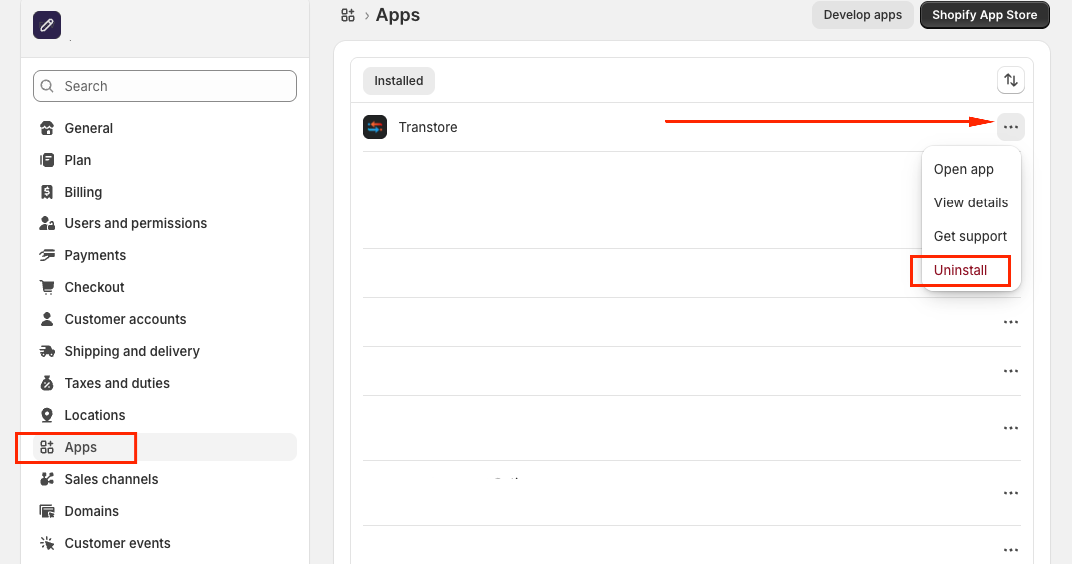
If you want to cancel the subscription of Transtore, please uninstall it by following these steps:
Go to Shopify Settings → App and sales channels → Transtore → Uninstall:
I. Billing Cycle Basics
Transtore uses a 30-day billing cycle for monthly plans. Here's what you need to know:
- Trial Period: Each store gets a 7-day free trial (one time only)
- No charges during trial: Uninstalling during your 7-day trial won't result in any charges
- Billing starts: After your trial period ends and you approve a paid plan
II. Reinstalling Within 30 Days
Good news! If you reinstall Transtore within your current 30-day billing cycle:
No Double Charges
- You can uninstall and reinstall multiple times
- You won't be charged twice for the same billing period
- Simply approve the charge when prompted (you won't actually be billed again)
Plan Changes
If you choose a different plan after reinstalling:
- Higher plan: Pay the prorated difference for the remaining days
- Lower plan: Receive prorated credit for remaining days
- Pricing follows Shopify's standard policy
III. Reinstalling After 30 Days
Important: If you reinstall Transtore after your 30-day billing cycle ends:
New Billing Cycle Starts:
- You'll be charged for a new billing period
- Your new 30-day cycle begins when you click "Approve Charge"
- This counts as a fresh subscription, not a continuation
Avoid Double Payment
To prevent being charged twice, make sure to reinstall within your current 30-day billing cycle if you plan to continue using Transtore.
If you need further guidance or have any questions, don't hesitate to reach out to our support team via email at [email protected]. We'd be happy to help!